
Blog · Fines
Company van speeding fines: who was driving, and the 28-day rule
By Raimondas Ivanovas, founder of vanstamp · · 10 min read
A speeding notice for a company van arrives a week or two after the event, addressed to the business. By then nobody remembers who had the van on Tuesday afternoon, and the clock is already running: you have 28 days to tell the police who was driving.
This guide explains how the notices work, what happens if you can't say who was driving, what to do when one arrives, how parking and other fines differ, and how to keep a record so the answer takes a minute. There's a free van driver log and fines tracker to download.
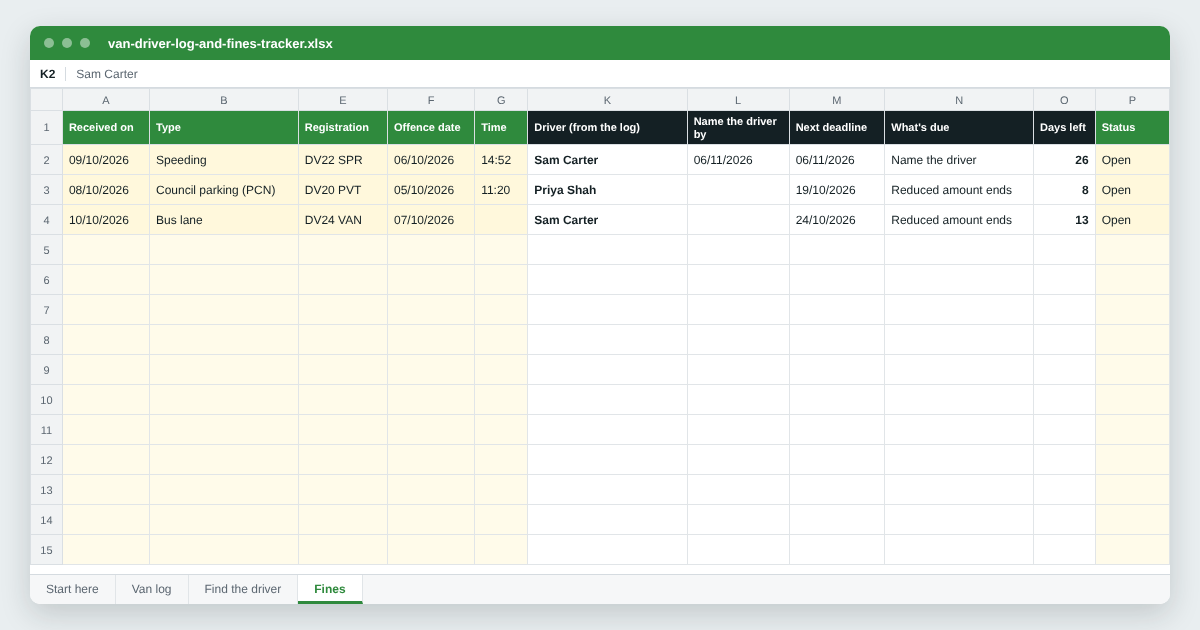
Free van driver log and fines tracker
Log who takes each van and when. When a notice arrives, type the registration, date and time and it tells you who had the van, from your log. Add the fine and it fills in the driver, works out the 28 days to name them and warns you as deadlines get close. Works in Excel, Google Sheets and LibreOffice.
Download the spreadsheetWhat happens when a company van is caught speeding
GOV.UK says that within 14 days of a vehicle being caught speeding, a Notice of Intended Prosecution (NIP) and a Section 172 notice are sent (speeding penalties). They're addressed to the registered keeper, which for a company van is usually the business, or the lease or hire company if the van isn't yours.
The Section 172 notice asks the keeper to say who was driving. Once the driver is named, they're sent their own notice and deal with the offence themselves.
The minimum penalty for speeding is a £100 fine and 3 penalty points. Some drivers are offered a speed awareness course instead, if the police decide it's appropriate and they haven't been on one in the past 3 years. If it goes to court, the fine is usually a percentage of weekly income, up to £1,000, or £2,500 on a motorway, and the driver can be disqualified.
Red light camera notices work the same way: the keeper is asked who was driving, and the offence carries 3 points (endorsement codes).
The 28-day rule: naming the driver
You must return the Section 172 notice within 28 days, telling the police who was driving. If you ignore it, you may have to go to court. The law behind it, section 172 of the Road Traffic Act 1988, makes it an offence for the keeper not to give the driver's identity when asked.
- For a person, failing to give the driver's identity (code MS90) carries 6 penalty points, twice the 3 points of a standard speeding penalty (endorsement codes).
- A company can't take points, but it can be prosecuted. A director, manager or similar officer can be guilty too if the company's offence happened with their consent or connivance, or through their neglect.
The 28 days count from when the notice was served, which can be a day or two before you opened it. Write the date it arrived on the notice and reply well before the deadline.
If you don't know who was driving
“We don't know” is rarely an answer a business can rely on. Section 172 has a defence for a keeper who did not know and could not with reasonable diligence have found out who the driver was. But for a company, that defence only works if it also shows that it kept no record of who drove the vehicle, and that not keeping one was reasonable.
For a business with several drivers sharing vans, it's hard to argue that not keeping a record was reasonable. A simple log of who had which van, and when, is your best protection, and it turns a week of asking around into a minute.
If you really can't narrow it down, take legal advice before you reply. Never guess, and never name someone you know wasn't driving: that can be a serious criminal offence in its own right.
When a notice arrives: step by step
- Write the date it arrived on the notice. and the date 28 days on. Put that deadline in the diary the same day, and aim to reply well before it.
- Check the details. The registration, date, time and place. Make sure it's your van and that you had it on that date; a van you've sold or returned is a different reply.
- Find who had the van at that exact time. Your van log or shift records first, then the rota, that day's daily check, fuel card lines (the statement shows the time and site of each fill), job sheets and delivery notes.
- Talk to the driver. Show them the details and make sure they agree it was them. Get their full name and address as they appear on their driving licence.
- Reply naming the driver. Online if the notice offers it, or on the form. Keep a copy and a note of when and how you sent it.
- Let the driver deal with their notice. The police send the named driver their own notice. Whether they accept the penalty, take a course if one's offered, or go to court is between them and the police.
- Record what you did. The notice, who you named and the date you replied, so the next query takes a minute.
Leased and hired vans
If your vans are leased, rented or on contract hire, the lease or hire company is usually the registered keeper. The notice goes to them first; they reply naming your business as the hirer, and you then get a notice of your own to name the driver.
That extra step uses up time since the offence, so deal with these the day they arrive. Many lease companies also charge an admin fee for each fine they pass on, so check your agreement.
Parking, bus lane and other fines
Not every fine needs a driver named. These don't carry penalty points, and the registered keeper usually deals with them:
- Council parking tickets (penalty charge notices). You usually have 28 days to pay, and in some cases the amount is reduced if you pay within 14 days. If you don't pay within 28 days you get a charge certificate and 14 days to pay the original amount plus 50% (parking tickets).
- Challenging a council ticket. You have 28 days to challenge it, and if you challenge within 14 days and it's rejected, you may only have to pay 50% (challenging a ticket).
- Bus lanes, yellow boxes and banned turns, where the council enforces them by camera, plus Clean Air Zone, ULEZ, Congestion Charge and Dart Charge penalties. Check each notice for its own deadlines and reduced amount.
- Private parking tickets (a supermarket or retail park) aren't fines; they're charges from a private company. Check the ticket for deadlines and how to challenge. If the company rejects your challenge, you can appeal to an independent service: POPLA for British Parking Association members, or IAS for International Parking Community members.
For all of these you still want to know who had the van, so you can decide whether the driver pays.
Who pays, and whose points
Penalty points always go to the person who was driving, never the company. For fines without points, decide in your driver policy who pays: the driver, or the company, recharging the driver.
If you want to take it out of their pay, GOV.UK says an employer can only make a deduction if the law requires it, the contract allows it, or the employee agrees in writing, and a deduction can't normally take their pay below the National Minimum Wage, even if they agree (deductions from pay). Put it in the driver's contract or policy before there's a fine, not after.
Check your drivers' licences
Points add up. A driver can be disqualified if they build up 12 or more points within 3 years (penalty points), and a new driver's licence is cancelled if they get 6 or more points within 2 years of passing their test (new drivers). A driver who's lost their licence can't drive your vans, so it's worth checking.
Check licences when someone starts, and regularly after that. The driver creates a check code on view or share your driving licence information; it's valid for 21 days and can be used once. You then enter it, with the last 8 characters of their licence number, on check someone's driving licence information to see the vehicles they can drive and any points or disqualifications. Only check with the driver's permission.
Keeping a record of who drove
Everything above is easier with one record: which van, which driver, from when to when. It can be a sheet in each van, a shared spreadsheet or software, as long as it's filled in every day, includes vans that change hands during the day, and is kept.
The free spreadsheet has three parts: a Van log for who took each van and when; Find the driver, where you type the registration, date and time from a notice and it lists who had the van; and a Fines list that fills in the driver from the log, works out the 28 days to name them for speeding and red light notices, and turns amber a week before each deadline.
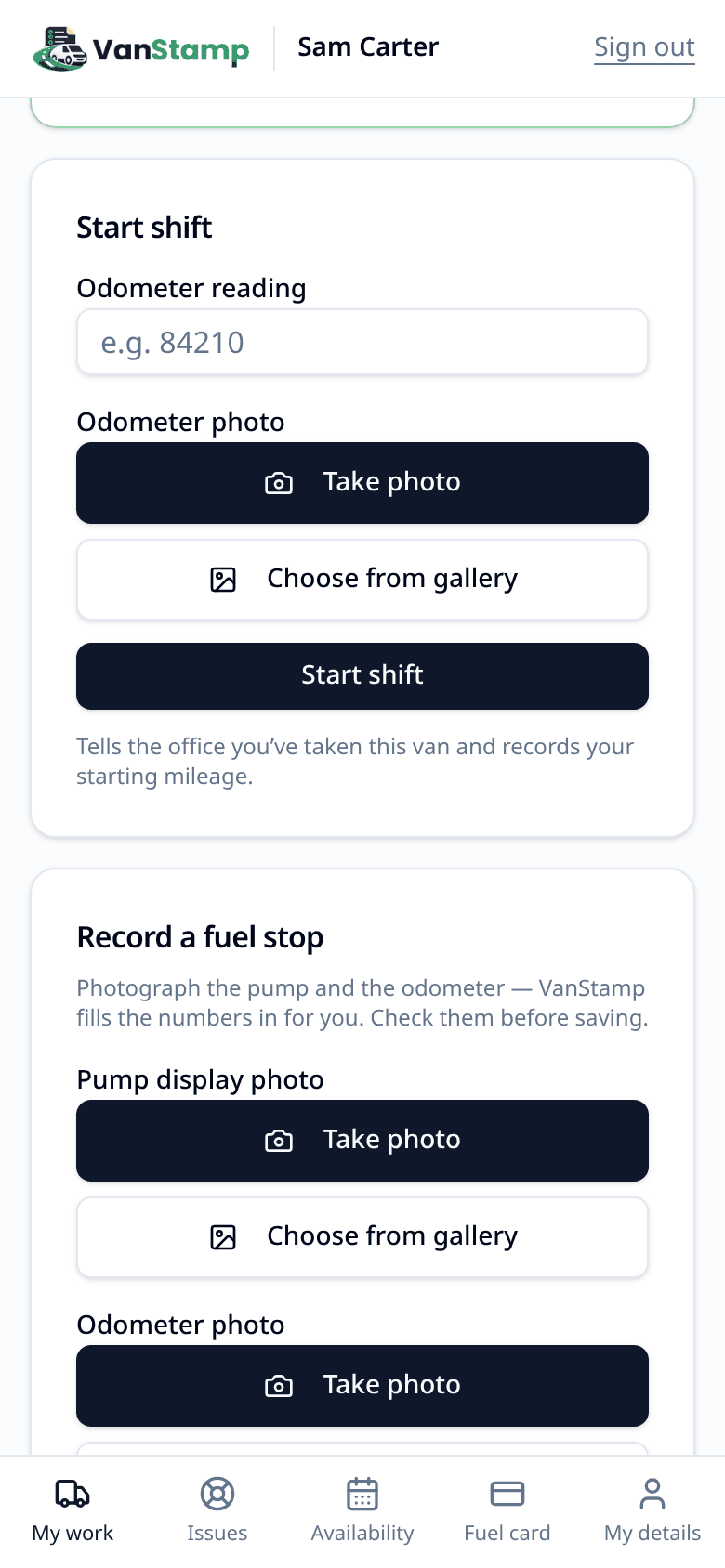
Its weak spot is the same as any log: it's only as good as what gets written down. In VanStamp the record keeps itself. Drivers start and end each shift on the van with an odometer photo, and every change of van is kept with its date.
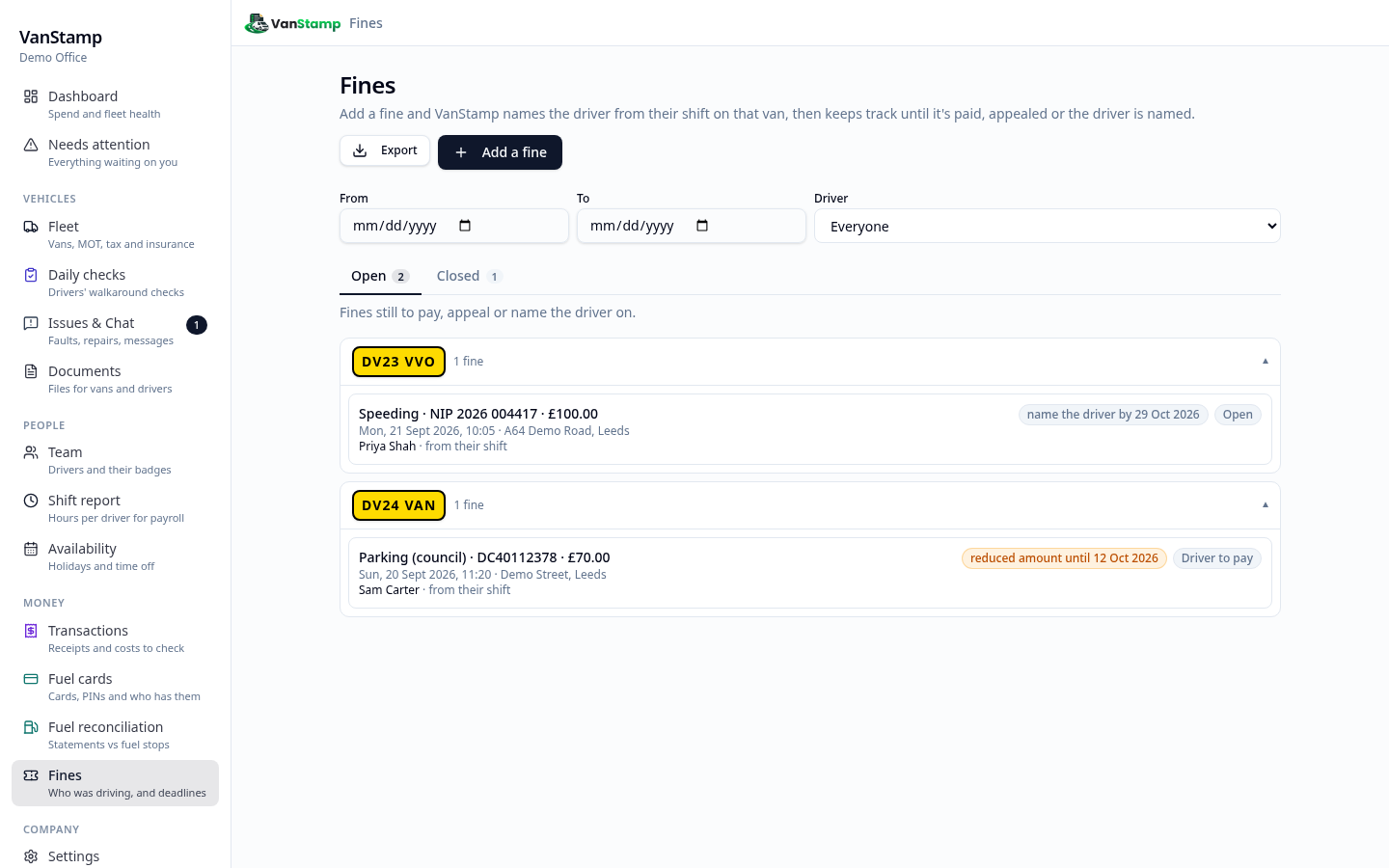
When a fine arrives, photograph it and VanStamp reads the reference, registration, time, place, amounts and deadlines for you to check. It then names the driver from their shift on that van at that moment, with the shift's odometer photos and that day's daily check as proof. With no shift, it suggests who had the van that day, clearly marked for you to check.
You choose what happens next: the driver pays, the company pays and recharges the driver, the company pays, appeal, or name the driver, with their details ready to copy into the issuer's form. VanStamp warns you before the reduced amount ends and before the 28 days to name the driver run out, and the driver sees the fine in their app and can reply. Fines are on the Business plan and above.
For the rest of running a small fleet, see our van fleet management guide, and for checking fuel card statements, our guide to fuel card reconciliation.
This guide covers the rules in general and isn't legal advice. For a particular notice, especially one you can't answer, take advice.
Questions people ask
How long do you have to name the driver of a company van?
28 days. GOV.UK says you must return the Section 172 notice within 28 days, telling the police who was driving (speeding penalties). The days count from when the notice was served, so don't leave it until the last day.
What happens if a company doesn't name the driver?
Failing to give the driver's identity is an offence under section 172 of the Road Traffic Act 1988. A company can't get penalty points, but it can be prosecuted, and a director or manager can be guilty too if it happened with their consent or connivance or through their neglect. For a person, the offence (code MS90) carries 6 penalty points.
Can the company just pay the speeding fine?
No. Speeding carries penalty points, and points go to the person who was driving, so the keeper has to say who that was. Paying doesn't replace naming the driver.
Do I have to name the driver for a parking ticket?
Not for a council parking ticket, bus lane fine or Clean Air Zone charge: they're penalties for the keeper to pay or challenge, with no points. Private parking companies may ask the keeper for the driver's name and address; check what the ticket says.
How long after the offence can a speeding notice arrive?
GOV.UK says the notices are sent within 14 days of the vehicle being caught speeding (speeding penalties). For a leased or hired van, the notice that reaches you can come later, because the lease company has to pass it on first.
Can a driver dispute a speeding notice?
Yes. They'll have to go to court if they plead not guilty, and GOV.UK says that if they're found guilty they can be fined more and get more penalty points (speeding penalties). The keeper still has to name the driver either way.
Does VanStamp use GPS to work out who was driving?
No. VanStamp doesn't track vehicle locations. It works out who had a van from the shifts drivers start and end on it, van switches during the day and the van each driver was given, with dates.